

Why is RJ headset volume so low?
Leave a message
As a direct manufacturer of call center headsets, we frequently receive feedback from customers during the after-sales process asking: "The headset volume is too low-is this a quality defect?" In reality, 90% of these "low volume" issues do not stem from a malfunction in the headset itself, but rather from certain inherent characteristics of the RJ interface.
Problem 1: No independent power supply, limited volume
The RJ9 interface (4P4C) transmits analog signals; consequently, the headset itself lacks an independent power supply and relies entirely on the audio amplification circuitry of the telephone or call box for its output. If the telephone unit itself has insufficient power output, the headset's volume will naturally suffer from an "inherent deficiency." In contrast, USB headsets feature a built-in sound card and independent power supply, resulting in a volume output that is typically much fuller.
Problem 2: Wiring sequence mismatch-the most common source of problems for RJ interface headsets
This constitutes the most frequent underlying cause behind customer feedback regarding "low volume."
a) Lack of Unified Industry Standards
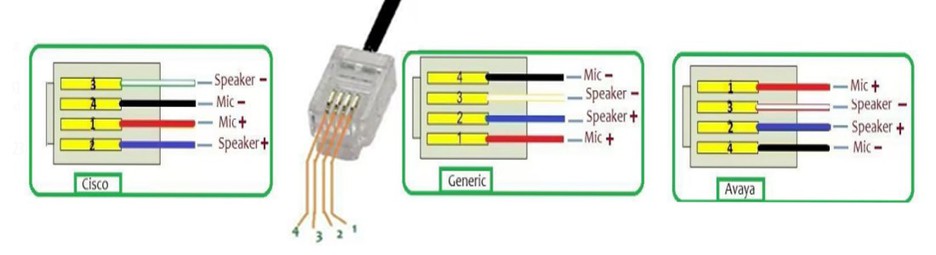
This is the most fundamental reason. Although the physical specifications of the RJ9 interface (also known as 4P4C) are standardized, there is no universal industry standard defining how the four internal wires correspond to the microphone and earpiece functions. Consequently, when designing their circuitry, each manufacturer is free to define the specific arrangement of these four wires.
|
What is "Wire sequence"?
What is 4P4C? It is an abbreviation for "4 Position, 4 Conductor."
|

b) Differences in Product Design Are an Objective Reality
The pin configurations (wire sequences) of telephones can vary significantly across different brands, different models or production batches within the same brand, and between analog and digital phones. For example, a phone from Brand A might have a pin configuration of "Mic+, Mic-, SPK+, SPK-," whereas a phone from Brand B might be configured as "SPK+, SPK-, Mic+, Mic-." A mismatch between the headset's pin configuration and that of the telephone is highly likely to result in audio anomalies.
Like call centers, telephone brands are numerous and batches differ, and complete wiring sequences cannot be provided. At this time, if purchasing RJ interface headsets with the same wiring sequence, when the headset wiring sequence does not match the telephone wiring sequence, the following typical situations will occur:
- Microphone volume is low or the other party cannot hear clearly: This is the most common symptom. For example, if the pin designated as "Mic+" on the telephone connects to the "Mic-" pin on the headset-or worse, connects to the earpiece circuit-the audio signal transmission will suffer severe attenuation.
-
You hear the other party's volume is low: If the earpiece pin configuration is mismatched, the received audio signal strength will be insufficient, leading to the frustrating situation where-despite having the volume turned up to the maximum-you still cannot clearly hear the other party.
-
Completely silent or sound on only one side: In cases of severe pin misalignment, audio may be audible in only one ear, or neither party may be able to hear anything at all.
- Echo or noise appears: Incorrect pin configurations can cause signal crosstalk, potentially triggering anomalies such as echoes, electrical buzzing, or other forms of interference.
Problem 3: Sound outlet blockage, sound "covered with a cloth"
After prolonged use, the sound outlets on the headphones can easily become clogged with saliva, dust, and skin flakes, causing the audio to sound as if it were muffled by a layer of cloth. Regularly cleaning the microphone grille and foam windscreen with a soft-bristled brush can typically lead to a significant improvement in sound quality.

Regarding the above problems, the source factory suggests:
| If unsure whether the wiring sequence matches, the testing method is: after plugging the headset into the telephone, first test the volume you hear, then call a colleague to test the volume the other party hears. If both are too low or one side is obviously abnormal, the possibility of a wiring sequence mismatch is very high. |
1. Confirm it is a wiring sequence problem (focus on troubleshooting):
- The Most Common Method: Provide the pin configuration diagram for your specific phone model. The factory can then adjust the headset's wiring accordingly before shipment. (Note: Simply providing the brand and model number may not be sufficient to guarantee compatibility.)
-
The most trouble-saving method: When purchasing an RJ-connector headset, simultaneously purchase an RJ-8T Wiring Sequence Conversion Box. This device features 8 adjustable settings, making it compatible with the vast majority of phones currently on the market. By simply toggling the switch, you can quickly identify the specific setting that enables normal call functionality-a one-time investment that ensures compatibility even if you upgrade your equipment in the future.
-
If you wish to purchase a call center headset, please refer to the following: Headsets Selection And Buying Guide

2. If the headset has been used for a long time, clean the microphone cotton and microphone cover in time;
3. Turn up the telephone and call software volume.
Note: Each Beien headset model offers a choice of six connector types. Among these, the USB and Type-C connectors support ENC noise cancellation, while the other connectors provide only passive noise cancellation.

Keywords: rj9 headset, headset with rj9, telephone headset, telephone headset for office, headset for telephone


