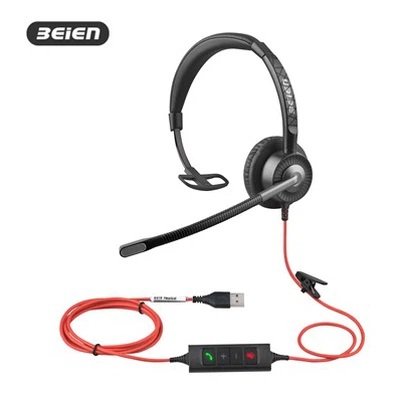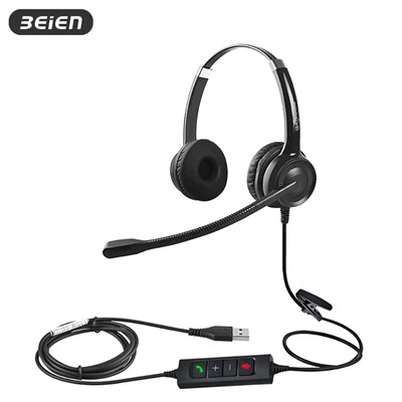


USB Headset With Noise Cancellation For PC
Product Model:CS12 USB-A
This brand-new binaural headset features dynamic EQ and SoundGuard technology, dynamically optimizing sound quality while protecting hearing. Wideband voice pickup ensures clearer audio, and a unidirectional microphone provides precise sound pickup. Ergonomic design elements, such as a lightweight construction, a retractable headband, adaptive ear cup adjustment, and protein-like earcups, contribute to a clear and comfortable call experience all day long.
Description
headset with noise cancellation feature and Advantage
CS12 usb headsets with mic Features (Same style single ear: CS11 USB-A Headset):
- Superior Noise Cancellation: Built-in independent sound card ensures a stable, clear, and consistent sound quality across various compatible devices. The USB-A interface and U30 in-line controls enable ENC dual-microphone noise cancellation, effectively blocking 90% of ambient noise, allowing your voice to be heard only.
- More Durable Overall Structure: The headband is made of 304 stainless steel with a TPE protective sleeve, making it lightweight, bend-resistant, comfortable to wear, and durable. The cable is custom-made, featuring a hydrolysis-resistant PU outer sheath and tinned copper core wire. The headphone cable contains fiber filaments and anti-breakage threads. In terms of manufacturing, copper terminals are applied to both ends of the cable, which is then injection molded in one piece, enhancing its tensile strength.
- More Comfortable to Wear. The retractable headband offers moderate tension, preventing pinching the head or ears; the adjustable earcups adapt to different ear shapes; the protein-like earcups are soft, comfortable, and breathable; weighing only 130g, it's comfortable to wear all day.
- USB-A interface compatible devices: Plug and play, such as desktop computers, laptops, all-in-one PCs, PlayStation and Xbox game consoles, etc.
usb headset with mic for pc Parameter
|
Speaker |
Microphone |
||
|
Size: |
28mm |
Direction: |
Uni-directional |
|
Frequency range: |
20Hz to 20kHz |
Frequency range: |
-42±3 dB (at 1kHz) |
|
Sensitivity: |
113±3dB (at 1kHz) |
Sensitivity: |
10Hz to 10kHz |
|
Maximum input power: |
50 MW |
Noise reduction: |
Existence |
|
Impedance: |
150Ω±5% |
Working Voltage: |
3V |
|
Hearing protection: |
118 dBA SPL |
Voltage Range: |
1-10V |
|
Degree of Distortion: |
<1% |
Impedance: |
2.2k |
pc headsets with mic & over ear headset with microphone details

Microphone
Unidirectional microphone for precise sound pickup

Arm Design
Threaded flexible hose, easy to bend and quick to position

SoundGuard
Limit sudden loud noises and protect hearing

Headband
Stretchable, lightweight and flexible

Cable
One-piece injection molding increases tensile strength.

Microphone pole
330° rotation for faster positioning

6 Interface available
RJ9 / MP3.5mm / PC2*3.5mm/QD/USB/Type C

Earmuffs
55mm protein-like earcups for comfort and breathability
Precautions for plugging and unplugging interfaces
1. Correct operating procedures for plugging and unplugging connectors: (Principle: Unplug the plug, not the cable)
- Place your fingers on the plug itself, not the cable.
- When inserting: Insert smoothly and vertically until you hear or feel a soft "click" (for some locking connectors), or feel noticeable resistance, indicating it is fully inserted.
- When removing: Grip the plug firmly with your fingers and pull it out vertically and smoothly along the direction of the port. If it feels a little tight, you can gently wobble it slightly from side to side, but never bend it forcefully up and down or side to side.
2. Common mistakes to avoid:
- Pulling the cord when unplugging: This is the most dangerous and common bad habit. The pulling force is concentrated at the connection between the plug and the cable, easily causing internal wires to break, resulting in poor contact and intermittent sound.
- Pulling at an angle: Lateral force can bend the plug and damage the fragile metal contacts inside the device port, causing the port to become permanently loose.
- Unplugging/plugging while the device is shaking: If a laptop or desktop computer is not stable, the port will be subjected to additional stress when plugging or unplugging.
- Using brute force: If it doesn't go in, first check if the orientation is correct; do not force it in.

Hot Tags: usb headset with noise cancellation for pc, China usb headset with noise cancellation for pc manufacturers, suppliers, factory, call center durable headset, call center heavy duty headset, usb a headset for corporate events, usb a headset for night photography, usb-a headset for carnivals, usb-a headset for festivals
Send Inquiry
You Might Also Like